
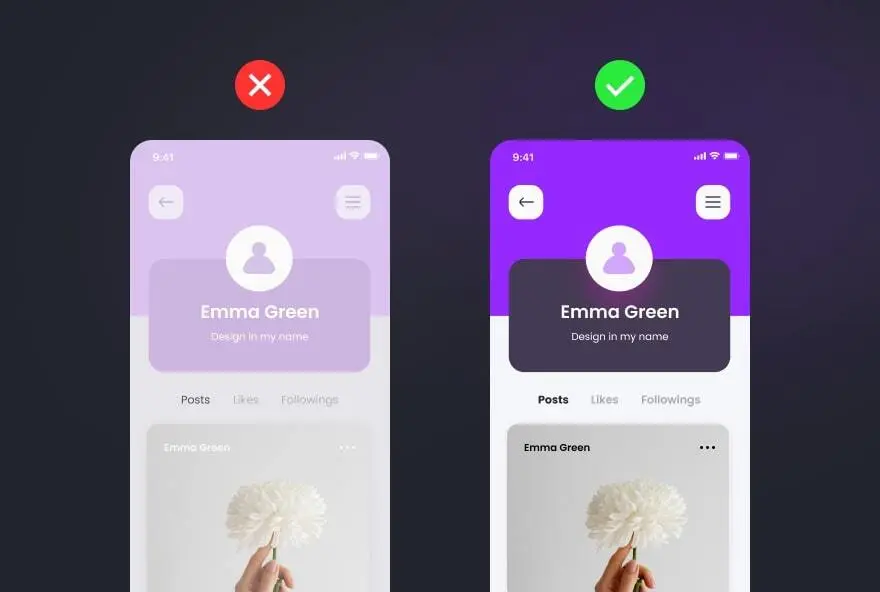
10 UI UX Design Mistakes You Should Avoid In 2025 Here are some UI/UX design mistakes to avoid in 2025 to ensure a seamless user experience and high engagement: 1. Ignoring Mobile-First Design In today's digital landscape, most users access websites and apps through their mobile devices. Designing for desktop first can result in a clunky, inefficient experience for mobile users, making it harder for them to navigate and interact with your content. The Mistake: Many designers still prioritize desktop experiences over mobile, leading to cluttered, non-responsive designs on smaller screens. Why It’s a Problem: With mobile traffic surpassing desktop usage, a poor mobile experience leads to higher bounce rates and lower conversions. Solution: Adopt a mobile-first approach. Design for smaller screens first, then scale up for larger devices. Ensure your website or app is fully responsive and provides an intuitive touch experience. 2. Overcomplicating Navigation A seamless navigation system is the backbone of good UX. If users struggle to find the information they need quickly, they are likely to leave your site or app in frustration. Keeping navigation clear and intuitive is essential for user retention. The Mistake: Complex navigation with too many options or hidden menus can confuse users and make it hard for them to find what they need. Why It’s a Problem: A complicated navigation system increases frustration, leading to a drop in user engagement and conversions. Solution: Keep navigation simple and intuitive. Use clear labels, limit the number of menu items, and ensure easy access to key features. 3. Poor Color Contrast and Readability The Mistake: Using low-contrast text or poor color choices can make content difficult to read, reducing accessibility for many users. Why It’s a Problem: Poor readability leads to user frustration and can make your site non-compliant with accessibility standards. Solution: Follow WCAG guidelines for contrast ratios. Use high-contrast colors for text and background, and ensure font sizes are readable on all devices. 4. Ignoring Accessibility the Mistake: Many designers overlook accessibility, failing to consider users with disabilities when designing interfaces.Why It’s a Problem: Ignoring accessibility alienates a significant portion of users and may lead to legal issues under accessibility regulations. Solution: Incorporate accessibility best practices, such as screen reader support, keyboard navigability, and alternative text for images. 5. Slow Loading Speeds The Mistake: Heavy graphics, unoptimized code, and excessive animations can slow down your website or app. Why It’s a Problem: Users expect fast load times, and a slow website can lead to high bounce rates and lost customers. Solution: Optimize images, use lazy loading, minimize HTTP requests, and implement efficient caching strategies. 6. Lack of Microinteractions The Mistake: Overlooking small but meaningful interactions like button animations, hover effects, or loading indicators. Why It’s a Problem: Microinteractions enhance user engagement and provide visual feedback, making interfaces feel more interactive. Solution: Incorporate subtle animations and responses to user actions to improve overall experience. 7. Using Too Many Fonts and Styles The Mistake: Mixing multiple fonts, inconsistent styles, and excessive typography variations. 8. Overloading Users with Information The Mistake: Cramming too much text, images, and elements into a single screen. Why It’s a Problem: Users feel Overwhelmed and may leave if they can't quickly process information. Solution: Use whitespace effectively, break content into digestible sections, and prioritize essential information. 9. Not Testing with Real Users The Mistake: Skipping usability testing and assuming your design works for everyone.Why It’s a Problem: What looks good to designers may not be intuitive for users, leading to poor user experience. Solution: Conduct user testing sessions, gather feedback, and iterate based on real user behavior. 10. Ignoring Dark Mode and Customization Options


Have an idea, a project requirement, or need expert guidance for your digital journey? Our team at Innovatix Technologies is here to help you with tailored solutions, quick support, and seamless communication. Get in touch with us today and let’s turn your vision into reality.

Ready to start a project?
Cyber City, 1207, near Silver Trade
VIP Circle To Utran Road, Uttran, Surat
technologiesinnovatix@gmail.com
Sales: (+91) 99250 49821